BUTTON LANGUAGE
1. Press Types
 A command is counted after you release the button and stop pressing for a short moment.
| Press type | How to do it | Plain meaning |
|---|---|---|
| Short | Quick press and release | Used for counting: 1, 2, 3, 4, and so on. |
| Short series | Several short taps in a row | The device counts the whole group after the last tap. |
| Long | Press longer than a normal tap, then release | Usually Stop, or part of Unlock / 3Alarm commands. |
| 4-7s hold | Hold for about four to seven seconds | Starts the RF soft tag deactivator from Ready. |
| 7-9s hold | Hold for about seven to nine seconds | Unlocks the device from Locked. |
Do Not Rush The Pause
When you make a short series, tap cleanly and then stop. The short pause tells the device: "that was the whole command."
2. Locked And Ready
After power or a hardware restart, the device is Locked. In Locked state, it cannot start a working mode by accident.
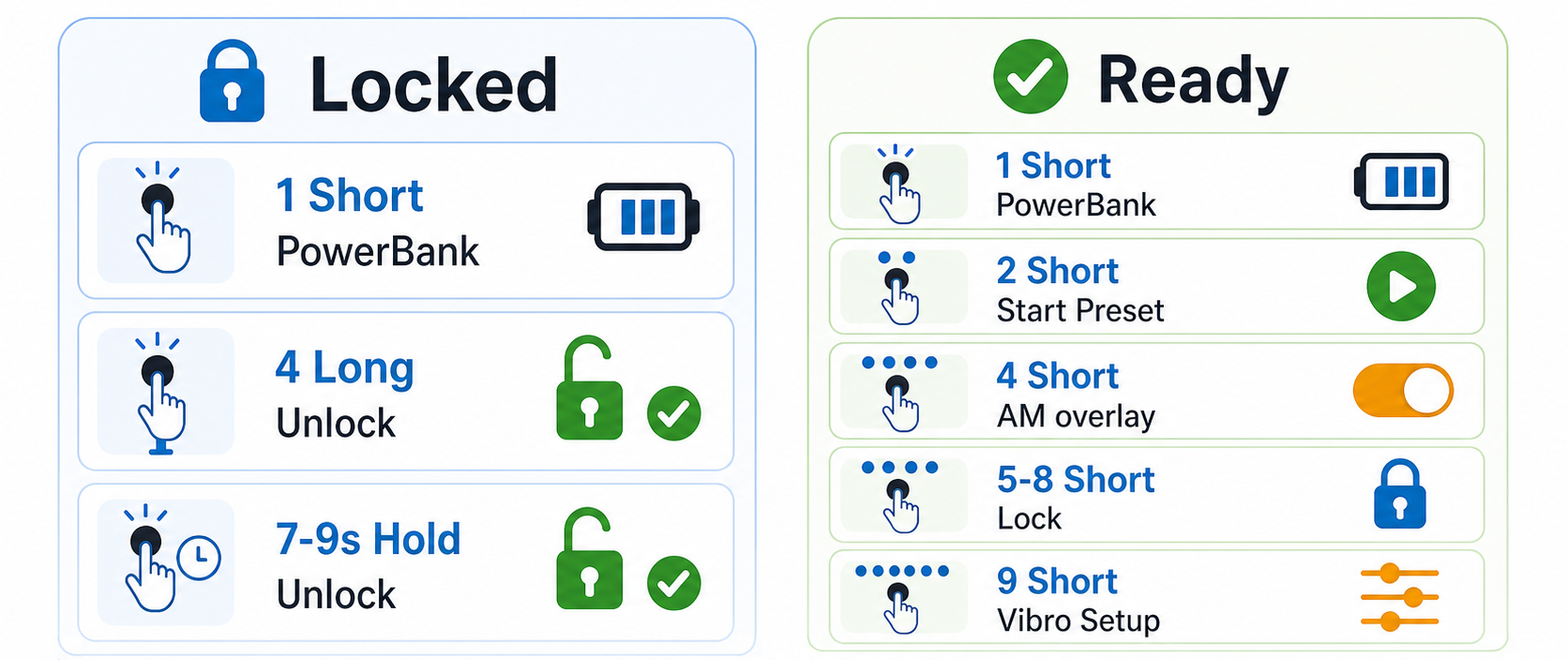 Locked is safe. Ready is where normal commands are available.
Use Locked when carrying or storing the device. One short tap only wakes or updates the powerbank indicator. It does not start a mode.
Unlock with 4 long presses or one 7-9 second hold. You should get a power-on style confirmation.
Ready means the device is awake and waiting. From here, 2 short taps start the current preset, 4 short taps toggle AM overlay, and 9 short taps open vibration setup.
One Short Tap Is Not Start
In Locked or Ready, one short tap is for the powerbank indicator. If you want to start a preset, use 2 short taps from Ready.