RADIOSET ANDROID HELPER
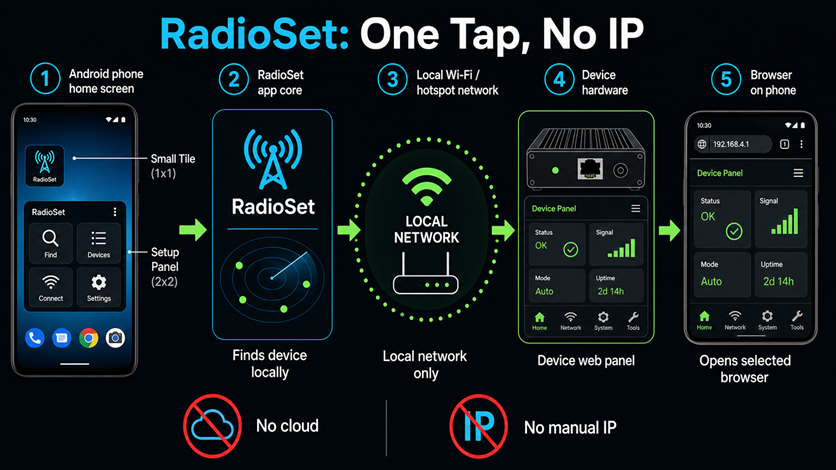 RadioSet: open the panel from an Android widget, without digging through hotspot settings.
1. WHY THIS EXISTS
On Android, the usual address device.local may not open when the device is connected through your phone's hotspot. The device can be connected correctly, but the phone may still fail to find it by that name. Then you have to open hotspot settings and look for the device address manually.
Without RadioSet, the usual workaround is annoying:
- open hotspot settings;
- find the connected device list;
- copy or remember the device address;
- paste it into the browser manually.
ANDROID HOTSPOT PAIN
RadioSet turns that routine into one tap. Tap the widget, wait a few seconds, and the device panel opens in your selected browser.
2. WHAT RADIOSET DOES
ONE-TAP ANDROID SHORTCUT
- Finds the device for you: RadioSet checks the Wi-Fi or hotspot your phone is using and looks for the device there.
- Opens the normal web panel: the browser interface remains the main control system.
- Needs no account or online service: it works directly through your Wi-Fi or phone hotspot.
- Lets you choose the browser: you can choose where RadioSet opens the panel without changing the default browser for the whole phone.
3. INSTALLATION
Download RadioSet.apk from this page on your Android phone.
Android may ask permission to install apps from your browser or file manager. Allow it for this install, then run the APK.
Long press the Android home screen, open Widgets, find RadioSet, and add both widgets if possible.
Use the larger Setup Panel widget to choose the browser and, if needed, customize the small tile name and icon.
After setup, the small 1x1 tile is the daily button. One tap checks the same Wi-Fi or hotspot and opens the panel.
4. WIDGETS
5. WHEN TO USE IT
RadioSet is most useful after you configure the device to connect to your phone's hotspot. That mode is recommended in the main web guide because your phone keeps mobile internet while the device joins your network as a client.
GOOD FIT
- Your Android phone is sharing a hotspot.
- The device is connected to that hotspot.
- You do not want to open hotspot properties and copy the device address.
- You want a repeatable home-screen entry point to the device panel.
It can also help whenever the phone and device are on the same Wi-Fi and device.local does not open reliably.
6. LIMITS
RadioSet does not open the device through the internet. It works only when your phone can reach the device directly: on the same Wi-Fi or through your phone's hotspot.
If the device is off, still booting, connected to another network, or outside Wi-Fi range, RadioSet may show that no device was found. In that case:
- check that the device is powered on;
- check that the phone hotspot is enabled;
- wait 5-10 seconds after the device reconnects;
- tap the widget again.